Switch from a trial subscription to paid
Before the subscription expires, you will receive a notification with instructions on choosing a plan to continue using the service. You can also switch to a paid plan before your trial subscription expires.
Please note: trial Microsoft MCE subscriptions can be automatically switched to a paid tariff plan with 25 or more licenses. If you need less than 25 licenses please order a new subscription from the catalog.
To switch to a paid subscription:
- Open the Client Control Panel (https://lv.squalio.com/client/auth/sign_in) and go through authorization process.
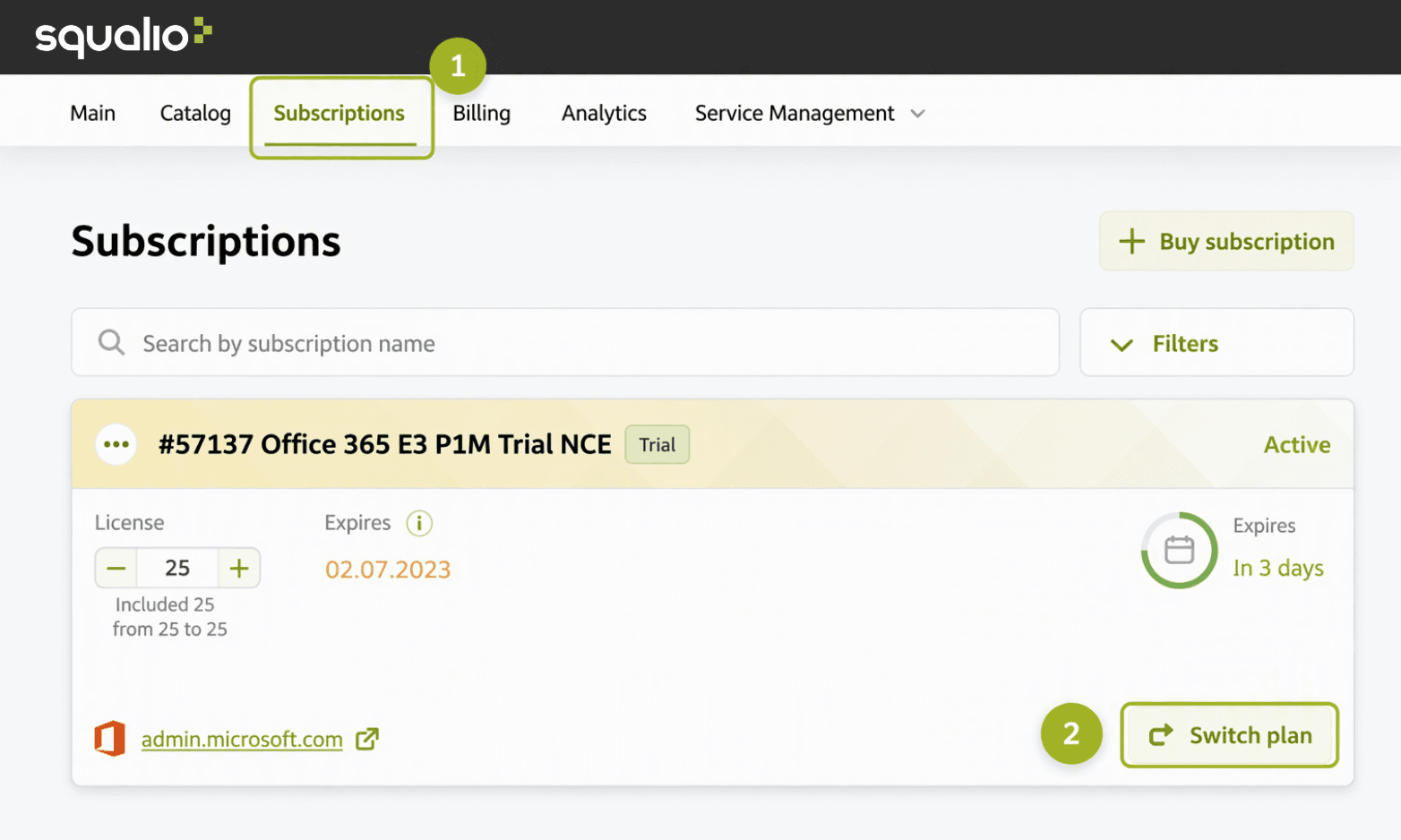
- Open the Subscriptions section ➀.
- Find the necessary subscription in the list of subscriptions.
- Click the button Switch plan ➁ in the subscription block.
- Choose the new plan and click Next.

- If necessary, enter the new number of licenses. The platform will automatically recalculate the subscription cost.
- Click Next and confirm the order.

Squalio Market
Customer Support | |
Microsoft Technical Support | |
Client Control Panel | |
Catalog |